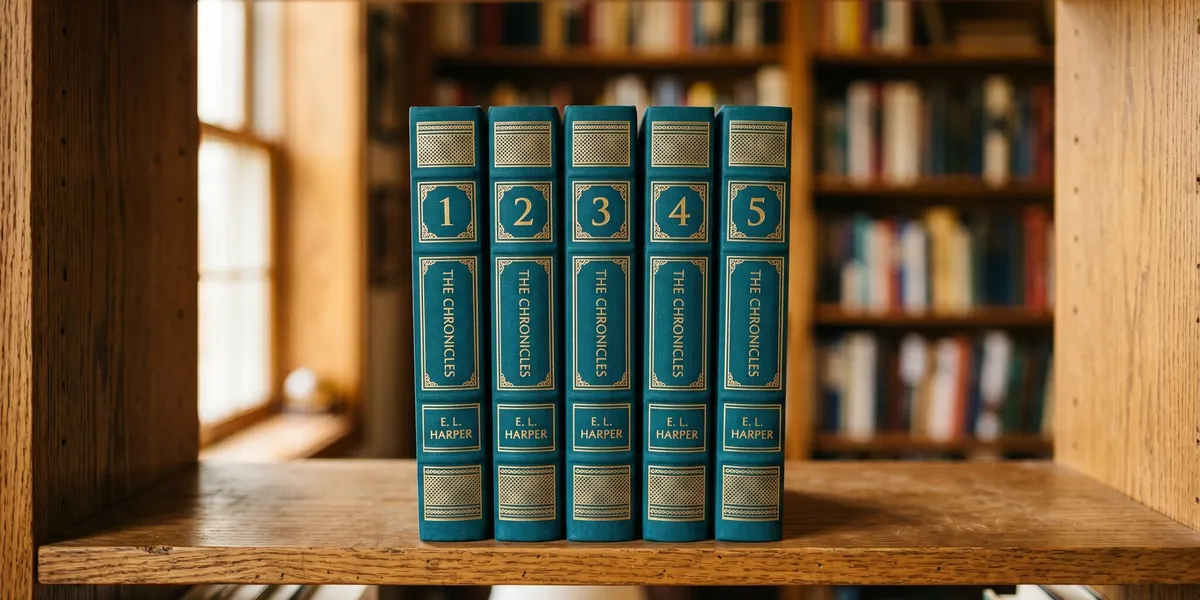
You can number a book series by assigning sequential whole numbers to each volume in publication or chronological order, then applying those numbers consistently across your covers, title pages, and retailer metadata.
In this guide, you’ll learn:
- The standard numbering formats and when to use each one
- How to handle prequels, companion novels, and spin-offs
- Amazon KDP’s specific series numbering requirements
- When standalone numbering works better than sequential numbering
Here’s how to get it right from book one.
How Do You Number Books in a Series?
The simplest approach is sequential whole numbers starting at 1. Your first published book is Book 1, the next is Book 2, and so on. This is the format readers expect and retailers require.
You have three common formats for displaying the number:
| Format | Example | Best For |
|---|---|---|
| Arabic numerals | Book 1, Book 2 | Most genres, KDP metadata |
| Written out | Book One, Book Two | Literary fiction, fantasy |
| Roman numerals | Volume I, Volume II | Epic fantasy, historical fiction |
Pick one format and stick with it across every volume. Mixing “Book One” on your first cover with “Book 3” on your third confuses readers and looks unprofessional.
The number should appear in three places for every book: on the cover, on the title page, and in the retailer metadata. If any of these three locations are inconsistent, you risk confusing both readers and the algorithms that group your books together.
If you’re planning a multi-book story, start by outlining your full series arc before you assign numbers. Knowing the total scope prevents renumbering headaches later.
Where to Place Series Numbers on Your Cover
Your series number should be visible on both the front cover and the spine. Readers browsing shelves — physical or digital — need to identify reading order at a glance.
Front cover placement options:
- Below the title: “Book Two of The Ember Chronicles”
- Above the title: “The Ember Chronicles #2”
- Integrated into a subtitle: “The Ember Chronicles: Volume Two”
Spine placement:
- Include the series number on the spine, especially for print editions. Readers who own multiple books in your series will shelve them together, and a visible number on the spine makes ordering intuitive.
Keep your book formatting consistent across all volumes. Same font, same placement, same style. A series should look like a set when lined up on a shelf.
How to Number a Series on Amazon KDP
Amazon KDP has specific rules for series numbering that differ from what you might put on your cover. Understanding these rules is critical because KDP creates your series page based on metadata, not your cover text.
KDP numbering rules:
- Enter digits only in the series number field (e.g., “3” not “Book 3” or “Book Three”)
- Series numbers must be whole numbers — KDP does not accept 0, 0.5, or 3.5
- The series name field should contain only the series name, not the number or book title
- All books in a series must use the exact same series name to link together
Your KDP series page appears within 72 hours after your titles go live, but only if the metadata is entered correctly. If your books aren’t linking, check that every volume has identical series name spelling.
Common KDP metadata mistakes:
- Putting “The” before the series name in some books but not others
- Including subtitle text in the series name field
- Using “0” for a prequel (KDP ignores it)
- Leaving the series number blank on one volume
Each book in your series also needs its own unique ISBN. The series itself doesn’t get an ISBN — individual volumes do.
How to Number Prequels in a Book Series
Prequels create the trickiest numbering challenge. The story comes before Book 1 chronologically, but you published it after other books in the series already exist.
Option 1: Make it Book 1 and renumber everything
If the prequel is a full-length novel and you want readers to start there, make it Book 1. Shift your existing Book 1 to Book 2, and so on. This works best when:
- You’re early in the series (2-3 books published)
- The prequel truly works as a starting point
- You’re willing to update all existing metadata and covers
Option 2: Give it the next sequential number
Number the prequel as the next book in the sequence (e.g., Book 4 if you have three existing books) and add “A Prequel” in the subtitle. This preserves your existing numbering and is the simplest option for KDP metadata.
Option 3: Create a separate sub-series
If you have multiple prequels or the prequel has a different tone, create a new series entry. For example: “The Ember Chronicles: Origins, Book 1” separate from “The Ember Chronicles, Book 1.”
Since Amazon KDP doesn’t accept 0 or 0.5, the “Book 0” approach that works on Goodreads won’t work for your retailer metadata. You’ll need to pick Option 1 or 2 for KDP while potentially using 0.5 numbering on platforms like Goodreads that support it.
Companion Novel vs Sequel: How Numbering Differs
A companion novel is a book set in the same world as your series but following different characters or a parallel storyline. A sequel continues the main narrative thread with the same core cast.
The numbering approach depends on how essential the companion is to the main series:
If the companion novel is required reading: Number it sequentially within the main series. If it falls between Book 2 and Book 3 in the timeline, make it Book 3 and shift your planned Book 3 to Book 4. Readers need to know exactly when to read it.
If the companion novel is optional: Create a separate series or sub-series. “The Ember Chronicles: Side Stories, Book 1” keeps it connected without disrupting the main numbering. Readers who want more can find it. Readers who only want the core story can skip it without confusion.
Interconnected standalone series blur this line further. Each book works alone, but they share a world. In these cases, numbering indicates publication order rather than required reading order — and labeling them clearly as “standalones” removes pressure on readers.
If you’re writing a romance series, companion novels featuring secondary characters from earlier books are extremely common. The standard approach in romance is to number them sequentially within the series, since romance readers typically want to read every book.
Standalone vs Series: Should You Number at All?
Not every collection of related books needs sequential numbering. The decision between standalone labeling and series numbering depends on how your books connect.
Use sequential numbering when:
- Books must be read in order to make sense
- There’s an overarching plot across volumes
- Characters develop across books in ways that require prior knowledge
- You’re writing a duology or trilogy with a continuous arc
Skip numbering (or use loose labeling) when:
- Each book tells a complete, independent story
- Books share a world but not a sequential plot
- Reading order doesn’t affect comprehension
- You’re writing interconnected standalones
Even when you skip cover numbering, still enter a series name and number in your KDP metadata. Amazon uses this data to create your series page and recommend related books. A series page with all your books linked together significantly boosts discoverability.
The hybrid approach: Some authors use “A [Series Name] Novel” on the cover without a number, while still entering sequential numbers in retailer metadata. This tells casual readers each book stands alone while still giving retailers the data they need to link the books.
How to Number Spin-Off Series
Spin-offs take a character, location, or concept from your original series and build a new story around it. The key numbering question is whether the spin-off is truly independent or whether it requires knowledge of the original.
Independent spin-off: Create a brand new series with its own numbering starting at Book 1. Reference the original series in marketing (“From the world of The Ember Chronicles”) but keep the numbering clean and separate.
Dependent spin-off: If readers need to finish the original series first, consider numbering the spin-off as a continuation. “The Ember Chronicles, Book 6” (even though it’s technically “Spin-off Book 1”) keeps the reading order clear.
The cleanest approach for most authors is a new series with clear branding that signals the connection:
- “The Ember Chronicles: New Generation, Book 1”
- “An Ember Chronicles Spin-Off, Book 1”
This lets new readers start fresh while signaling to existing fans that the worlds connect.
How to Track Series Numbering Across Multiple Books
As your series grows beyond three or four books, tracking numbering across volumes, prequels, companion novels, and spin-offs gets complicated. A series bible helps you keep everything organized.
Your numbering tracker should include:
- Publication order vs. chronological order
- Retailer metadata numbers (what KDP shows)
- Cover display numbers (what readers see)
- Goodreads/BookBub numbering (if different)
- Planned future volumes and their tentative numbers
If you’re using an AI writing tool like Chapter to draft your series, you can keep your series bible and numbering plan in the same workspace where you write. Having your numbering conventions documented alongside your manuscript prevents continuity errors as you move between volumes.
Common Numbering Mistakes to Avoid
- Changing your numbering system mid-series. Switching from “Book One” to “Book 4” looks inconsistent and confuses readers.
- Forgetting to update metadata when you add a prequel. If you renumber, update every volume’s KDP metadata, not just the new book.
- Using different series names across retailers. “The Ember Chronicles” on Amazon and “Ember Chronicles Series” on Barnes & Noble prevents cross-platform linking.
- Numbering a box set as a series entry. Your three-book box set is not “Book 4.” Keep box sets out of the numbered sequence.
- Skipping numbers. If Book 2 isn’t published yet, don’t publish Book 3 first. Gaps in numbering alarm readers and confuse retailers.
How Many Books Should a Series Have?
A series can have anywhere from two books (a duology) to dozens of volumes. The right number depends on your story’s scope and your genre’s expectations.
Genre norms for series length:
- Romance: 3-8 books per series (each following a different couple)
- Epic fantasy: 3-7 books with a continuous arc
- Mystery/Thriller: 5-20+ books (often open-ended with a recurring protagonist)
- YA Fantasy: 2-4 books per arc, sometimes with spin-off series
- Literary fiction: 2-3 books (trilogies are most common)
Don’t announce a total book count until you’re confident in it. Telling readers “Book 1 of 12” creates expectations. If you end at Book 8, some readers will feel shortchanged. Saying “Book 1 of The Ember Chronicles” gives you flexibility.
Should You Number a Book Series on the Cover?
The cover number debate comes down to genre expectations and series structure.
Yes, put numbers on the cover if:
- Your series must be read in order
- Your genre expects it (fantasy, sci-fi, thriller)
- You have more than three books (readers lose track without visible numbers)
Consider skipping cover numbers if:
- Each book is a true standalone
- You’re in literary fiction (where series numbering can feel commercial)
- You only have two books and the connection is obvious from the titles
Even if you skip the number on the cover, include it on the title page and in all retailer metadata. The title page is where libraries, catalogers, and detail-oriented readers look for official series information.
FAQ
What Is the Best Way to Number a Book Series?
The best way to number a book series is to use sequential whole numbers starting at 1, displayed consistently across your covers, title pages, and retailer metadata. Use Arabic numerals (1, 2, 3) for maximum clarity, and enter digits only in your Amazon KDP series number field.
Can You Use 0 or 0.5 for a Prequel Number?
You cannot use 0 or 0.5 as a prequel number on Amazon KDP — the platform requires whole numbers starting at 1. However, Goodreads and BookBub do accept 0 and 0.5 numbering. For KDP, either make the prequel Book 1 and renumber, or assign it the next sequential number with “A Prequel” in the subtitle.
Do You Need an ISBN for Each Book in a Series?
Yes, you need a separate ISBN for each book in a series. Each edition (paperback, hardcover, ebook) of each book also requires its own ISBN. The series itself does not receive an ISBN, though it may qualify for an ISSN (International Standard Serial Number) in some cases. Learn more about ISBNs.
How Do You Set Up a Series Page on Amazon?
You set up a series page on Amazon by entering a consistent series name and sequential whole numbers in the KDP metadata for every book. Amazon automatically creates the series page within 72 hours of your titles going live. All books must use the exact same series name spelling to link correctly.
Should Spin-Offs Be Numbered Separately From the Main Series?
Spin-offs should generally be numbered as a separate series with their own Book 1. Use branding that signals the connection to the original series (e.g., “An Ember Chronicles Spin-Off”) while keeping the numbering independent. This lets new readers enter through the spin-off without needing to read the original series first.