You can make a comic book from scratch — even if you can’t draw — by following a clear process from concept to printed page.
In this guide, you’ll learn:
- How to develop your story concept and write a comic book script
- The page layout and panel design basics every creator needs
- How to ink, color, letter, and polish your pages
- Where to print and publish your finished comic book
Here’s the step-by-step process from blank page to finished comic.
What Do You Need to Make a Comic Book?
Making a comic book requires a story concept, a script, page layouts, artwork, lettering, and a printing or publishing method. You don’t need expensive equipment or formal art training to get started. Many successful indie creators work with basic supplies or free digital tools.
Here’s a breakdown of what you’ll actually need:
For traditional (hand-drawn) comics:
- Pencils (HB and 2B for sketching)
- Bristol board or comic book template paper (11” x 17”)
- Inking pens (Micron pens or brush pens)
- A ruler and T-square for panel borders
- An eraser and correction fluid
For digital comics:
- A drawing tablet (Wacom, iPad with Apple Pencil, or Huion)
- Software like Clip Studio Paint, Procreate, or Krita (free)
- Comic book page templates (most software includes these)
For writers who don’t draw:
- A word processor for scripting
- A tool like Chapter to develop your story and dialogue
- A collaborator, freelance artist, or AI art tool for visuals
You don’t need all of these on day one. Start with whatever you have and upgrade as your project grows.
How to Write a Comic Book Script
Every great comic starts with a script. Your comic book script is the blueprint that tells the artist (even if that artist is you) exactly what happens on every page and in every panel.
A comic book script template follows this basic format:
PAGE 1

Panel 1 (wide establishing shot)
[Description of what the reader sees]
CAPTION: Narration text goes here.

Panel 2 (medium shot)
[Description of action]
CHARACTER NAME: Dialogue goes here.

Panel 3 (close-up)
[Description of character expression or detail]
CHARACTER NAME: Response dialogue.
Tips for Writing Your First Script
Think visually. Every line you write becomes a drawing. Instead of writing “Sarah felt nervous,” write “Sarah grips the edge of the table, knuckles white.” Give your artist something to draw.
Keep dialogue short. Comic book panels have limited space. If a speech bubble covers more than a third of the panel, you’ve written too much. Aim for 25 words or fewer per bubble.
Control your pacing. Each page is a unit of storytelling. The bottom-right panel is where the reader’s eye lands last before turning the page — use it for a mini cliffhanger or reveal to keep them reading.
If you’re developing a longer story with complex character arcs and plot threads, a tool like Chapter can help you outline your story structure and develop your character arcs before you start the visual work. You can draft your entire narrative, then adapt it into panel-by-panel script format.
For a deeper dive into visual storytelling scripts, check out our guide on how to write a graphic novel script.
Comic Book vs. Graphic Novel: What’s the Difference?
A comic book is a short, serialized publication (typically 22-32 pages) while a graphic novel is a longer, self-contained story (100-500+ pages) published as a complete book. Both use sequential art to tell stories, but they differ in length, format, and publishing approach.
| Feature | Comic Book | Graphic Novel |
|---|---|---|
| Length | 22-32 pages | 100-500+ pages |
| Format | Serialized (monthly issues) | Complete, self-contained |
| Binding | Stapled (saddle-stitched) | Perfect bound or hardcover |
| Story | Ongoing or mini-series | Beginning, middle, and end |
| Cost to print | $1-3 per copy | $5-15+ per copy |
| Best for beginners | Yes — shorter commitment | Larger scope, more time |
If this is your first project, start with a short comic book (8-24 pages). You’ll learn the entire process faster and build momentum for larger projects.
A collected series of comic books can later become a graphic novel “trade paperback” — so starting with short issues doesn’t limit your long-term vision.
How to Design Your Comic Book Page Layout
Page layout is how you arrange panels on a page to control pacing, eye flow, and visual impact. This is where comic books become a unique storytelling medium — your layout choices affect how the reader experiences your story.
The Basic Grid
Most comic books use a grid-based layout — typically 6-9 panels per page arranged in rows. This is the safest starting point for beginners because it keeps pacing consistent and is easy to read.
Standard layouts include:
- 3x2 grid (6 panels) — the workhorse of superhero comics
- 3x3 grid (9 panels) — popularized by Watchmen, great for dialogue-heavy scenes
- 2x3 grid (6 panels, wider) — balanced between action and conversation
Breaking the Grid
Once you’re comfortable with grids, you can break them for dramatic effect:
- Splash pages — one image fills the entire page (use for dramatic reveals)
- Double-page spreads — art spans two facing pages (use sparingly for maximum impact)
- Irregular panels — angled or overlapping panels create tension and energy
- Borderless panels — removing borders makes a moment feel infinite or dreamlike
Panel Flow Rules
Western comics read left to right, top to bottom. Your layout should always guide the reader’s eye naturally in this direction. If a reader has to guess where to look next, the layout has failed.
Key principle: Action within panels should flow left-to-right to match reading direction. A character running left feels like they’re going backward.
How to Sketch and Pencil Your Comic Pages
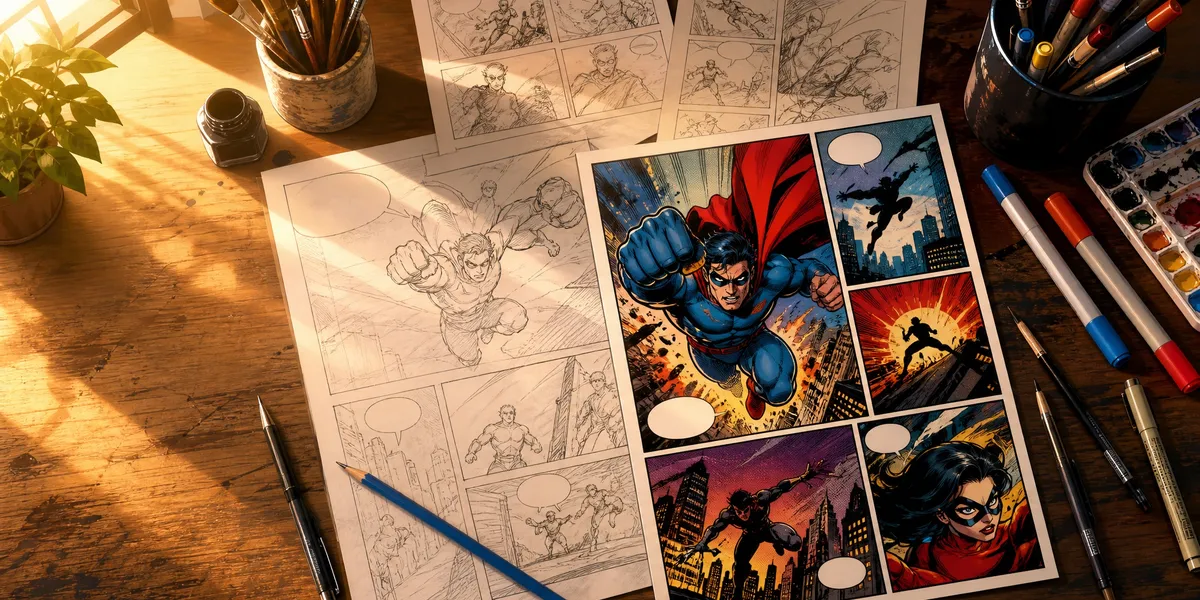
With your script and layouts ready, it’s time to draw. This stage is called “penciling” — you’re creating detailed pencil drawings that will be inked later.
Thumbnailing First
Before you draw full-size pages, create thumbnails — tiny, rough sketches of each page at about 2” x 3”. Thumbnails let you:
- Test your page layouts quickly
- Spot pacing problems before investing hours in detailed art
- Plan your visual storytelling panel by panel
Spend 5-10 minutes per page on thumbnails. They should be rough — stick figures and basic shapes are fine.
Penciling Your Pages
Once your thumbnails work, scale up to full-size pages:
- Draw panel borders using a ruler — keep gutters (space between panels) consistent at about 1/4 inch
- Block in the composition — rough shapes for characters, backgrounds, and key elements
- Add detail — refine anatomy, facial expressions, background elements
- Leave space for speech bubbles — plan where dialogue will go before finalizing the art
Pro tip from the Clip Studio Paint community: Draw backgrounds on a separate layer from characters. This saves you hours if you need to reposition elements later, and lets you reuse backgrounds across multiple panels in the same scene.
Don’t worry about perfection at the pencil stage. The inking step is where clean lines happen.
How to Ink Your Comic Book Pages
Inking transforms rough pencil drawings into crisp, reproduction-ready black-and-white art. It’s the step that gives comic books their iconic bold look.
Traditional Inking Tools
- Brush pens (Pentel Pocket Brush, Kuretake No. 13) — for organic, expressive lines
- Technical pens (Micron, Copic Multiliner) — for precise, consistent lines
- Dip pens and India ink — traditional method with maximum control
Digital Inking
If you’re working digitally, Clip Studio Paint and Procreate both have excellent comic inking brushes. Digital inking has a major advantage: Ctrl+Z. You can undo mistakes instantly, adjust line weights, and experiment freely.
Inking Techniques
Line weight variation is the most important inking concept. Thicker lines on the outside of figures create separation from backgrounds. Thinner lines within figures suggest internal detail and texture.
- Thick outlines (0.5-1.0mm) for character silhouettes and foreground objects
- Medium lines (0.3-0.5mm) for internal details
- Thin lines (0.1-0.3mm) for textures, hatching, and distant objects
Spotting blacks — filling large areas with solid black — adds depth and drama to your pages. Use it for shadows, night scenes, and silhouettes.
How to Color Your Comic Book
Coloring sets the mood, defines the world, and guides the reader’s eye. You have three main approaches:
Black and White
Many successful indie comics and graphic novels are black and white. It’s a legitimate artistic choice, not a shortcut. Black-and-white comics are also significantly cheaper to print.
Flat Colors
Flat coloring uses solid colors without gradients or rendering. It’s the classic comic book look, and it’s the fastest coloring method. Tools like Clip Studio Paint’s fill tool make this efficient.
Full Rendering
Full rendering includes highlights, shadows, textures, and atmospheric effects. This is the most time-consuming approach but creates the most visually rich pages. Most mainstream comics use this method.
Color palette tips:
- Choose 3-5 dominant colors for each scene and stick to them
- Use warm colors (reds, oranges) for high-energy action scenes
- Use cool colors (blues, purples) for calm or eerie scenes
- Give each main character a signature color so readers can identify them instantly
How to Letter Your Comic Book
Lettering is the art of placing readable dialogue, narration, and sound effects into your comic panels. Bad lettering ruins good art — it’s one of the most underrated skills in comic creation.
Lettering Basics
- Speech bubbles — white with a black outline, tail pointing to the speaker
- Thought bubbles — cloud-shaped with small circles leading to the thinker
- Caption boxes — rectangular, usually for narration or location/time stamps
- Sound effects — integrated into the art, styled to match the sound (a “BOOM” looks different from a “whisper”)
Digital Lettering Tools
Most creators today letter digitally, even if their art is hand-drawn:
- Clip Studio Paint — built-in text and balloon tools
- Adobe Illustrator — industry standard for professional letterers
- Canva (free) — workable for simple projects
Lettering Rules
- Place bubbles in reading order — top-left bubble is read first, bottom-right is read last
- Never cover important art — bubbles go over backgrounds, not over character faces or key action
- Use a comic font — not Times New Roman. Free options like Blambot’s fonts are designed for comics
- Bold for emphasis — bold individual words, not entire sentences
- Keep it brief — if your bubble text wraps more than 3-4 lines, it’s too long
How Much Does It Cost to Print a Comic Book?
Comic book printing costs range from $1-5 per copy for a standard 24-page issue, depending on quantity, color, paper quality, and binding method. Larger print runs dramatically reduce per-unit cost.
Here’s a realistic cost breakdown:
| Print Run | Per Copy (B&W) | Per Copy (Color) | Total Cost Range |
|---|---|---|---|
| 50 copies | $3-5 | $5-8 | $150-400 |
| 100 copies | $2-4 | $3-6 | $200-600 |
| 500 copies | $1-2 | $2-4 | $500-2,000 |
| 1,000+ copies | $0.75-1.50 | $1.50-3 | $750-3,000 |
Where to Print
Print-on-demand services (no upfront cost, higher per-unit price):
- Amazon KDP — for graphic novels and collected editions
- IngramSpark — wider distribution network
- Mixam — popular specifically for comics and zines
Offset printers (bulk orders, lower per-unit cost):
- PrintNinja — specializes in comic books and graphic novels
- Kness — US-based comic printer
- China-based printers — cheapest per unit for large runs (1,000+)
If you’re just starting, print-on-demand eliminates financial risk. You can always move to offset printing once you know your comic sells.
For more on self-publishing costs and distribution, check out our guide to self-publishing a book on Amazon.
How to Publish Your Comic Book
You have several paths to get your comic into readers’ hands:
Digital Publishing (Fastest, Free)
- Webtoon/Tapas — massive audiences for serialized comics (free to upload)
- Gumroad/Itch.io — sell digital PDFs directly to fans
- Amazon Kindle — publish as a Kindle comic (fixed-layout format)
- Your own website — host a webcomic with full creative control
Print Publishing
- Print-on-demand — KDP, IngramSpark, or Mixam (see cost table above)
- Self-published print runs — order from a printer and sell at conventions, online stores, or local shops
- Kickstarter — crowdfund your print run and build an audience simultaneously
Traditional Publishing
Submit to comic publishers if you prefer a traditional route:
- Image Comics — creator-owned, accepts submissions
- Dark Horse — accepts pitches from new creators
- Boom! Studios, IDW, Oni Press — open to indie submissions periodically
Traditional publishers handle printing and distribution but take a larger revenue share. Most indie creators earn more per copy through self-publishing.
Can You Make a Comic Book With AI?
Yes — AI tools can help you write scripts, generate concept art, create panel layouts, and even produce finished comic pages. AI won’t replace the creative vision behind a great comic, but it dramatically lowers the barrier to entry for creators who can’t draw.
AI for Comic Book Writing
Chapter helps you develop your comic’s story outline, dialogue, and character arcs before you start the visual production. Over 10,000 authors have used Chapter to write books, and the structured story development works especially well for planning the narrative backbone of a comic book or graphic novel script.
AI for Comic Art
Several AI image generators can produce comic-style artwork:
- Midjourney — strong at comic book aesthetics with the right prompts
- DALL-E — good for concept art and character design exploration
- Clip Studio Paint AI — AI-assisted features within the industry-standard comic tool
AI-generated art works best for concept exploration, mood boards, and rough visualizations. For a polished, consistent finished comic, you’ll likely need to refine AI output or collaborate with a human artist.
Common Mistakes to Avoid When Making Your First Comic
- Writing too much dialogue — comics are a visual medium. If you can show it, don’t tell it. Cut your dialogue by 30% from your first draft.
- Ignoring page turns — every right-hand page reveal is a storytelling opportunity. Plan your surprises for page turns.
- Inconsistent character design — create a model sheet with your character from multiple angles before you start drawing pages. Refer to it constantly.
- Skipping thumbnails — jumping straight to full-size pages is the fastest way to waste time on layouts that don’t work.
- Perfectionism on page one — your art will improve as you draw more pages. Finish the whole comic, then go back and fix early pages if needed.
How Long Does It Take to Make a Comic Book?
A 24-page comic book typically takes 3-6 months for a solo creator working part-time, or 4-8 weeks for a team of writer, artist, colorist, and letterer. Your timeline depends on art complexity, experience level, and whether you’re working alone or with collaborators.
Here’s a rough timeline for a solo creator making a 24-page comic:
| Stage | Time Estimate |
|---|---|
| Script writing | 1-2 weeks |
| Thumbnailing | 2-3 days |
| Penciling | 4-8 weeks |
| Inking | 2-4 weeks |
| Coloring | 2-4 weeks |
| Lettering | 3-5 days |
| Editing and revisions | 1-2 weeks |
| Total | 12-22 weeks |
Professional comic artists who draw full-time typically pencil and ink one page per day. If you’re learning as you go, expect slower output at first — and that’s completely fine.
What’s the Best Paper Size for a Comic Book?
The standard American comic book is printed at 6.625” x 10.25” (trim size), but artists typically draw on 11” x 17” Bristol board, which is then reduced to print size. Drawing larger gives you more room for detail and makes inking easier.
Common formats:
- Standard American comic — 6.625” x 10.25” (trim)
- Manga tankōbon — 5” x 7.5” (smaller, digest-size)
- European album — 8.5” x 11.5” (larger format)
- Mini-comic/zine — 5.5” x 8.5” (half letter, folded)
If you’re printing through KDP or IngramSpark, check their book formatting specifications for exact bleed and margin requirements.
FAQ
How Do You Make a Comic Book With No Drawing Skills?
You can make a comic book without drawing skills by writing the script and collaborating with an artist, using AI art tools, or creating a simple style that matches your skill level. Many successful comics use minimalist art — think stick figures (xkcd) or simple shapes (Cyanide & Happiness). The story matters more than photorealistic art. You can find freelance comic artists on DeviantArt, ArtStation, or Fiverr.
How Much Does It Cost to Make a Comic Book?
Making a comic book costs anywhere from $0 (doing everything yourself digitally) to $5,000-15,000+ (hiring professionals for art, coloring, and lettering). A typical indie creator hiring an artist pays $75-200 per page for pencils and inks. Adding color costs $35-75 per page. Lettering runs $10-25 per page. A 24-page comic with hired talent totals roughly $2,880-7,200 before printing.
Can You Make Money Selling Comic Books?
Yes, you can make money selling comic books through direct sales, conventions, digital platforms, and crowdfunding. Many indie creators earn $5,000-50,000+ per Kickstarter campaign for a single comic issue or graphic novel. Digital sales through platforms like Gumroad provide passive income with zero inventory costs. Convention sales (at $5-15 per issue) can be profitable once you build a following.
What Software Do You Need to Make a Comic Book?
The most popular software for making comic books is Clip Studio Paint ($50 one-time or $2/month), which includes specialized comic tools for panels, speech bubbles, screentones, and page templates. Free alternatives include Krita (drawing/inking), GIMP (coloring), and Canva (lettering). Procreate ($13 one-time) is the top choice for iPad-based comic creation. For story development and scripting, Chapter helps you plan your narrative before production.
What Is the Difference Between a Comic Book and a Graphic Novel?
A comic book is a short, serialized publication (22-32 pages per issue) while a graphic novel is a longer, self-contained narrative (100-500+ pages) published as a single bound book. Comic books typically release monthly as ongoing series. Graphic novels tell a complete story in one volume. Both use sequential art — panels arranged in sequence to tell a story through images and text. Many graphic novels are collected editions of previously published comic book issues.